
Over the past month, we’ve shipped a set of updates focused on one simple goal: help our customers understand how AI answers are built and give them clearer ways to influence them.
These features are designed to make your GEO workflow more practical, more focused, and more actionable.
Here’s what’s new:
1. Paragraph-Level Citation Intelligence for AI Answers
What’s new
Until now, when analyzing an AI-generated answer for a given prompt, you could see which external sources (citations) influenced the answer at a general level.
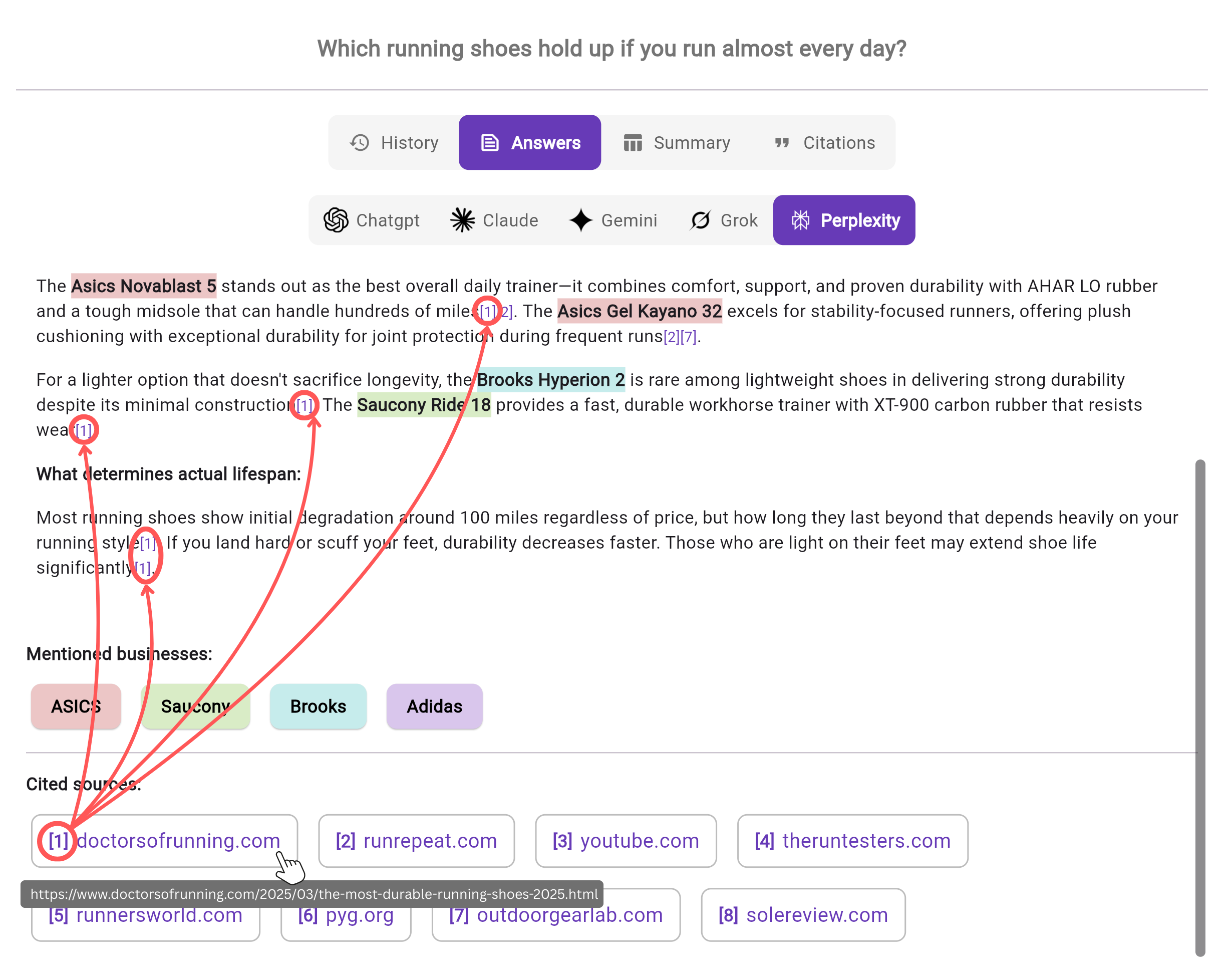
Now, you can see exactly which sources influenced specific paragraphs and even sentences within the answer.
Because Chatoptic measures AI visibility through personas, you can analyze each persona’s version of the answer and identify which external sources shaped which parts of the response.
Why it matters
Not all citations carry equal weight.
Some sources may only support a small detail, while others shape large portions of the narrative.
With paragraph-level citation mapping, you can:
- Identify which sources have the strongest influence on answer framing
- Detect sources that repeatedly shape responses across multiple personas
- Spot dominant narratives that are driving AI-generated positioning
If you notice that one particular source consistently influences large sections of answers across several personas, that’s a strong signal.
It likely means this source plays a central role in how AI models construct responses in your category and it’s a place where your brand should appear.
Instead of just knowing who was cited, you now understand who is shaping each part of the answer.
2. Citations analysis at the prompt level
What’s new
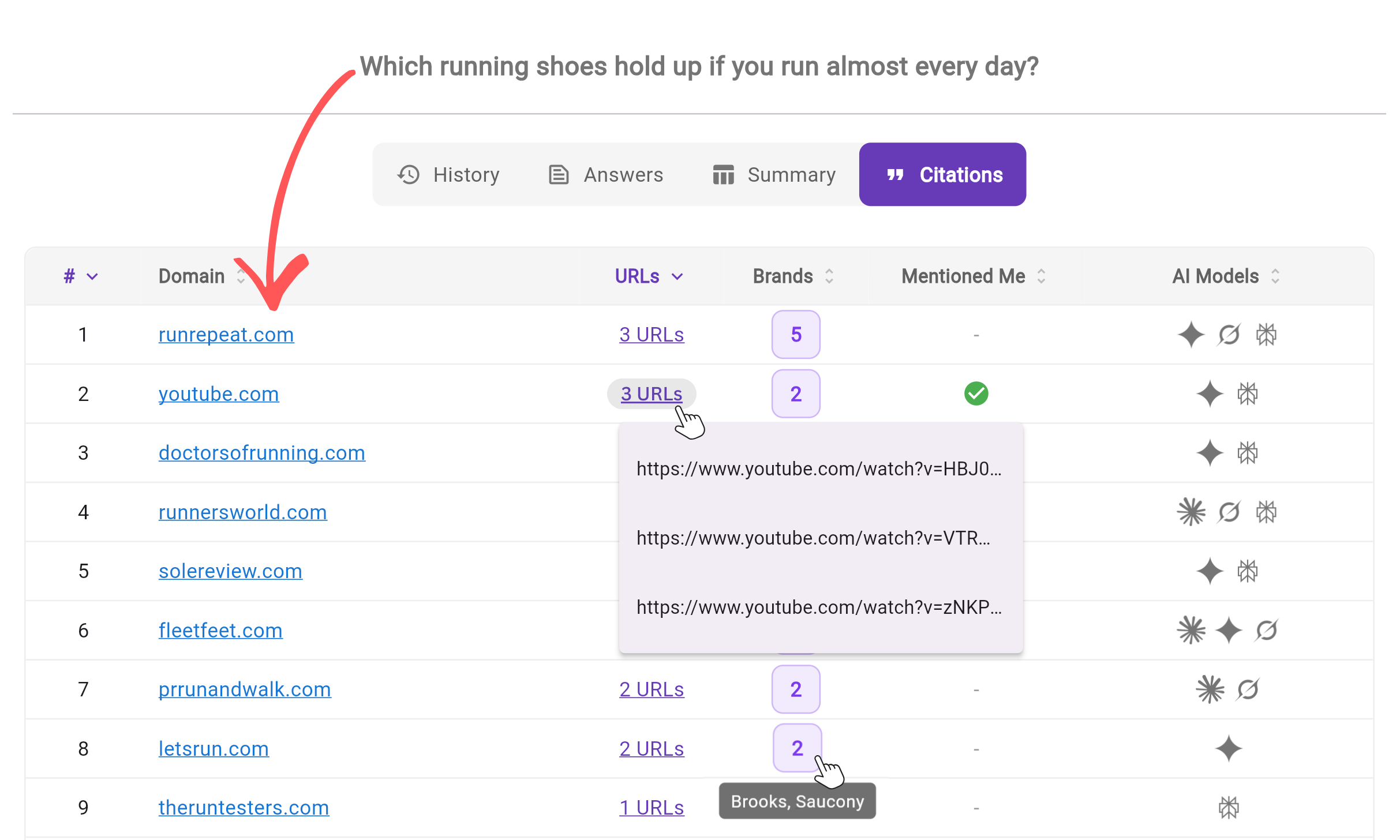
When you open a single prompt settings and navigate to the Citations tab, you can now see the exact domains the model relied on and the specific URLs within each domain.
Instead of just seeing that a source was used, you now see exactly which pages influenced the answer, in which AI models they appeared, which brands are mentioned there, and whether your brand is included.
Why it matters
This gives you direct visibility into where AI models are pulling information from.
You can now:
- Discover new external sources worth being mentioned in
- Identify content gaps
- Add your brand to relevant pages to increase future inclusion in AI answers
3. Query Fan-Out visibility across AI models
What’s new
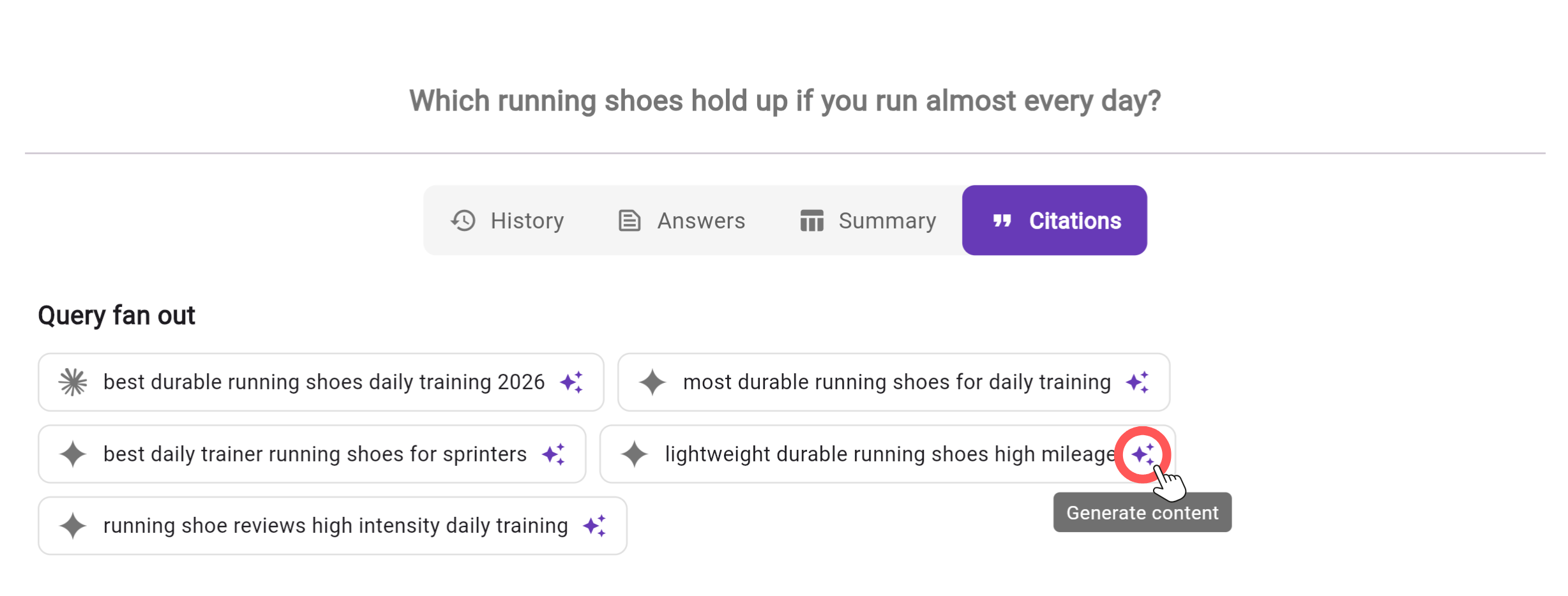
You can now see how a prompt is split into sub-queries (query fan-out) when an LLM performs a search.
When web search is triggered, those sub-queries appear in the Citations tab for each AI model that used them.
Even better, you can click the content creation icon next to any sub-query and instantly generate LLM friendly content around that specific term using Chatoptic Persona Writer.
Why it matters
This shows you how AI actually thinks.
Instead of optimizing only for the main prompt, you can now optimize for the actual building blocks behind the answer.
For example: If you have a blog post targeting the main query, you can expand it with sections that directly address these sub-queries. This increases semantic coverage and improves your chances of being selected and cited.
4. New Citations Report and Competitor Gap Analysis
What’s new
We’ve launched a new Citations Report that aggregates external sources across all tracked prompts in one place.
Inside the report, you can:
- See every source where your brand appears
- View competitor mentions
- Filter by specific LLMs
- Analyze citation source types (blogs, news sites, aggregators, social platforms, and more)
- Identify sources where competitors appear and you don’t
Why it matters
Until now, citation analysis required reviewing prompts one by one.
Now you get a complete map of your external presence across AI-generated answers, including where competitors are gaining visibility instead of you.
This allows you to:
- Spot patterns
- Identify dominant source types
- Understand where influence is concentrated
- Detect brand mention gaps in sources that already shape AI answer.
In the following example, YouTube was cited as a source in AI answers for 22 of the prompts I’m tracking (including which specific AI models cited it). Across 24 YouTube videos, my brand did not appear while my competitors did.
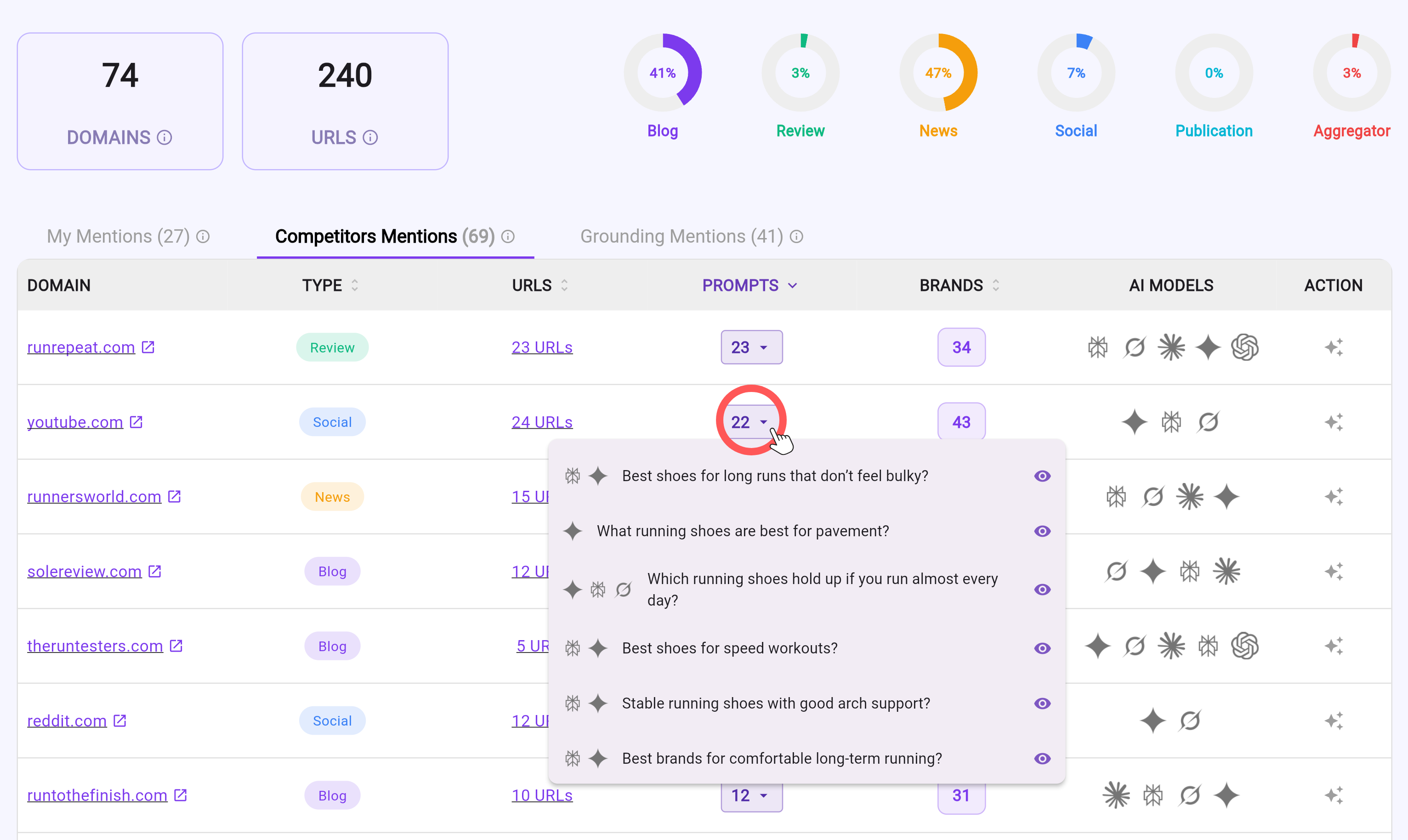
This type of brand mention gap within relevant citation sources for the prompts I’m monitoring helps me focus my efforts on more effective external brand mention activities.
If competitors are mentioned in a YouTube video, Facebook post, news article, or industry blog post, you can engage there strategically. Even adding a relevant comment that includes your brand in context can influence whether that source includes you the next time a model scans it.
5. Chatoptic Prompt Tags: AI Visibility by Topic
What’s new
You can now assign tags to prompts and view AI visibility by tag inside the Overview tab.
Tags can be also created and managed from the Profile section.
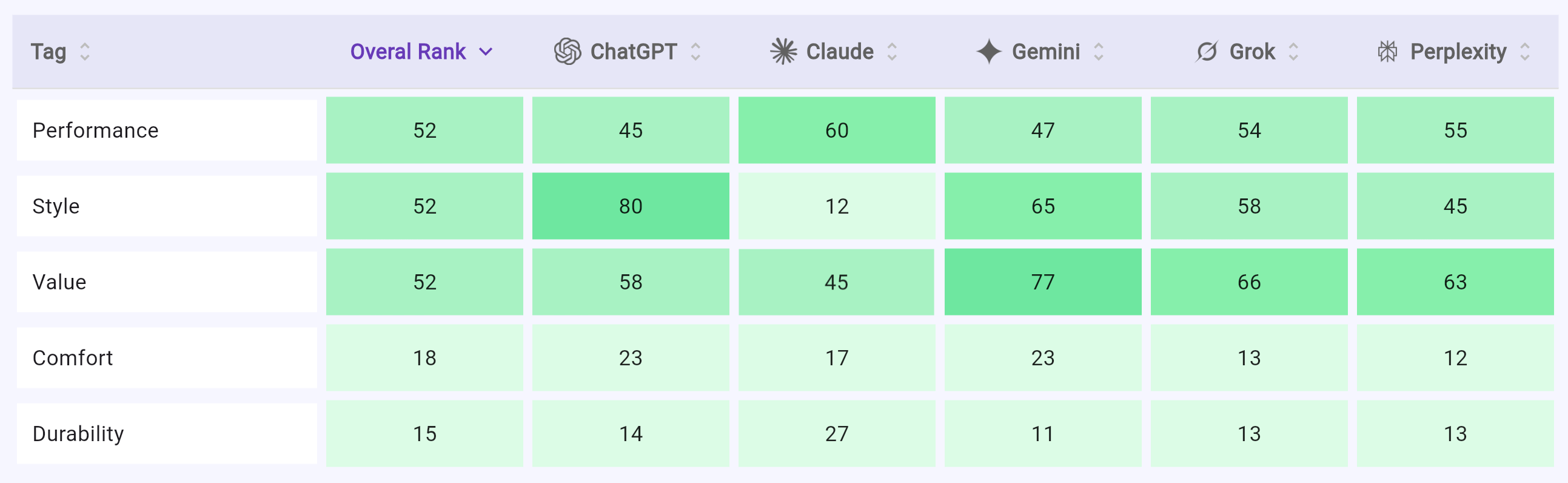
Why it matters
Instead of viewing visibility as one aggregated number, you can now analyze it by any segmentation like: products, services, features, topics etc.
This allows you to understand where you’re strong and where you need to invest more effort.
It also makes reporting to internal stakeholders much clearer.
6. Competitor Filtering and Mentions Across Prompts
What’s new
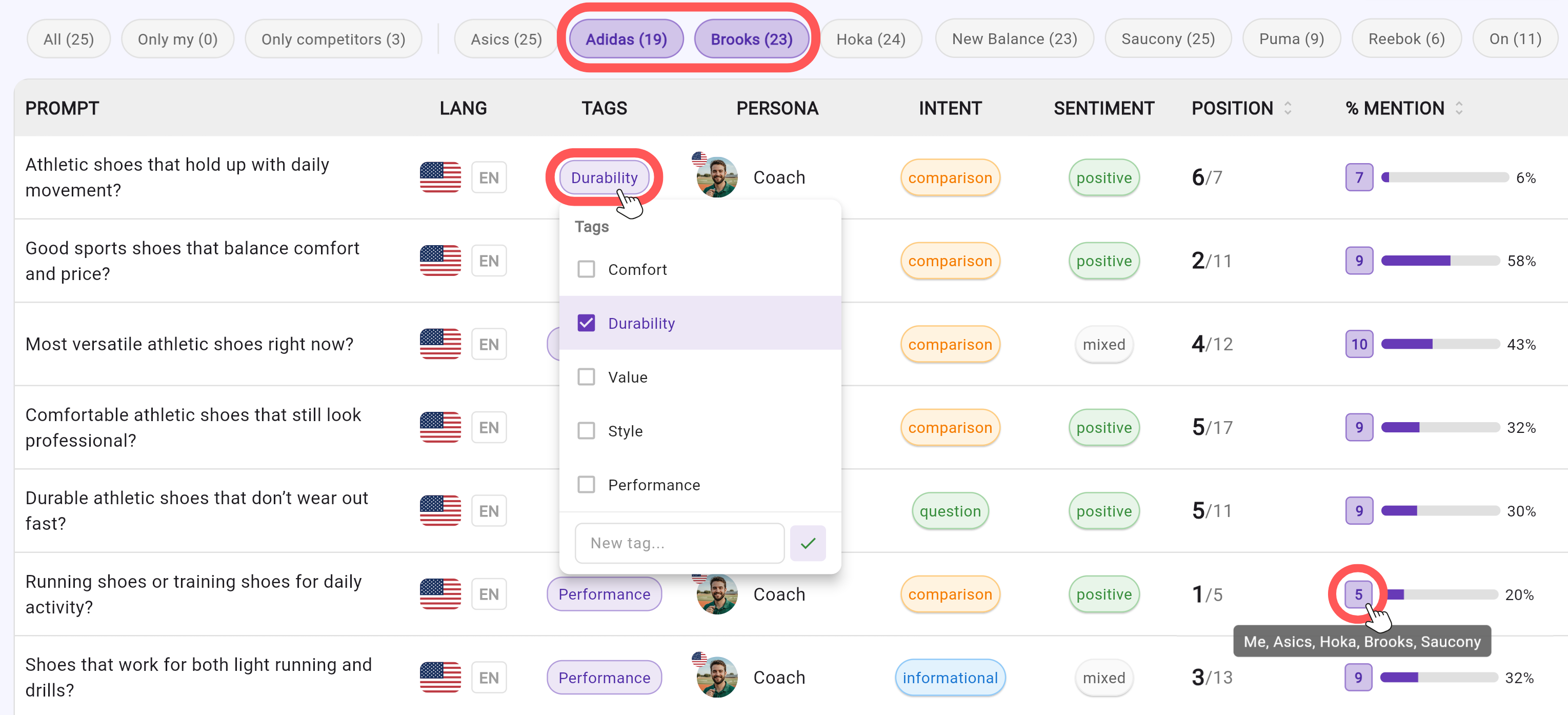
On the Prompts screen, you can now:
- Filter prompts to show only cases where specific competitors appear
- Identify prompts where competitors appear and you don’t
- Spot prompts where only competitors are mentioned
- See, directly inside the list, which competitors appeared for each prompt
- Assign tags to prompts directly from the table (following the new Prompt Tag system from previous section)
The default view still shows all prompts, but you can quickly narrow down based on competitor presence and focus areas.
Why it matters
When tracking dozens or hundreds of prompts, manually reviewing each one isn’t practical. Instead of scanning everything, you focus only on what needs to change.
These filtering and visibility tools allow you to:
- Instantly identify coverage gaps
- Focus on prompts where competitors dominate
- Prioritize action based on real competitive exposure
- Organize prompts into relevant tags without switching screens
When working at scale, this level of control makes it much easier to focus your GEO efforts on the prompts that actually require attention.
7. Competitor Website Assignment for More Accurate Data
What’s new
When adding or editing competitors, you can now assign each competitor their official website.
Why it matters
Some brand names are shared across multiple websites.
By linking a competitor to a specific domain, you ensure the data reflects the correct entity.
The result: more accurate visibility tracking and cleaner competitive insights.
See It Live on Your Brand
All of these features are already live inside Chatoptic AI Visibility Dashboard, but the real value shows when you see them applied to your own brand, your competitors, and your prompts.
If you’d like to see how Query Fan-Out, Citation Intelligence, and Visibility Segmentation work in practice, let’s walk through it together.
Book a short live demo and we’ll show you exactly where your brand stands in AI answers and where the biggest opportunities are.