
Ask your account data questions, generate reports, uncover gaps, and get recommendations based on your real AI visibility data.







Chatoptic’s AI Visibility Agent analyzes your prompts, personas, competitors, citations, sentiment, and AI answers, then helps you understand what matters, what changed, and what to do next.
Built around your audience, it does more than summarize dashboards. It helps you investigate why your brand appears, why competitors win, which personas see you differently, and which actions can improve your AI visibility.
A dashboard can tell you that visibility changed, a competitor gained mentions, or sentiment dropped. It does not automatically explain what happened or connect the result with the prompts, personas, answers, and sources behind it.
Finding that explanation can require opening several reports, comparing multiple models, reading full answers, and connecting the findings manually.
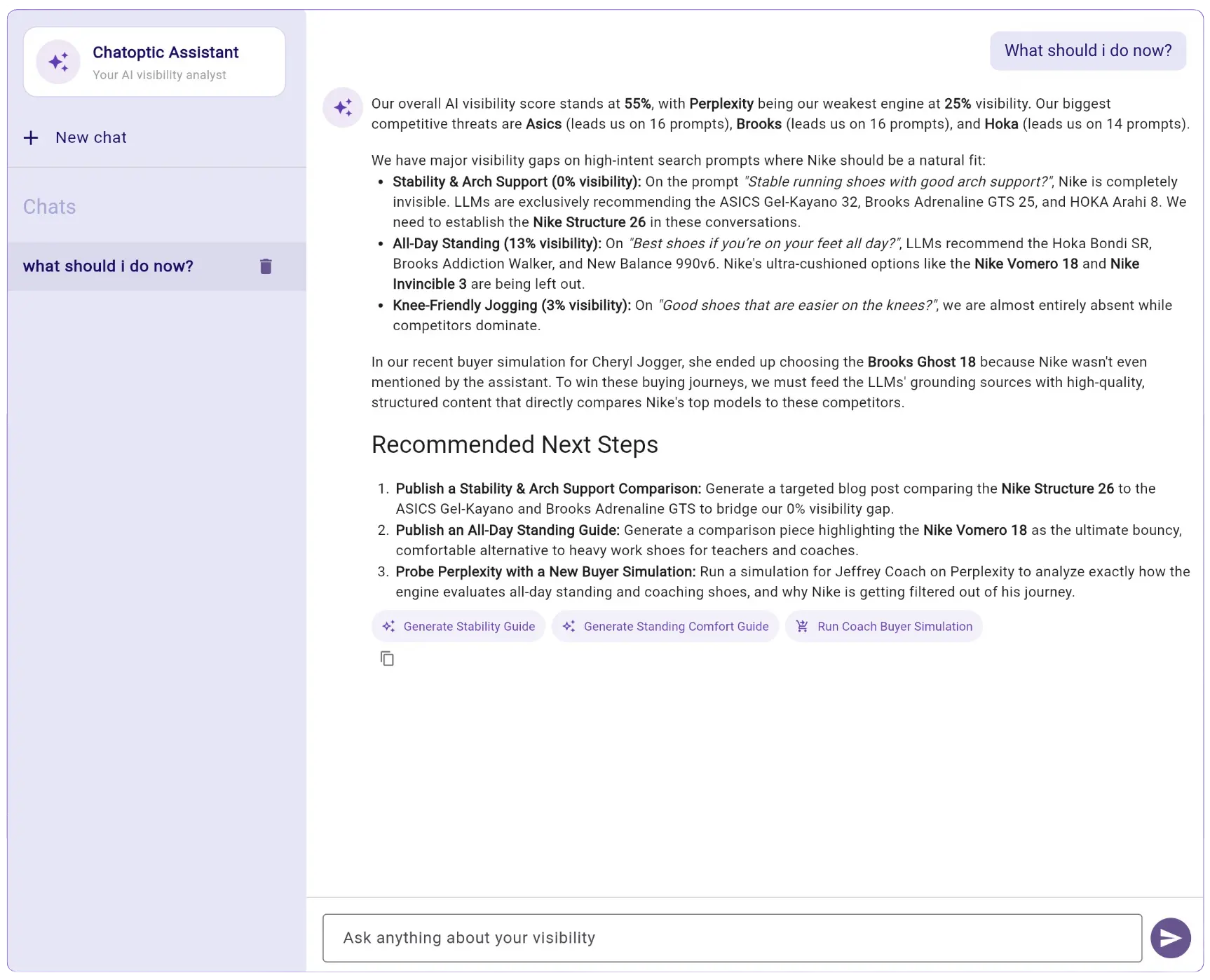
Chatoptic AI Assistant brings the relevant data together and lets you investigate it through a natural conversation.
Open Chatoptic AI Assistant while signed in to your account (buttom right side of the screen).
The assistant works inside the platform, so there is no connector, API key, or external setup required.
Write your question in plain language, just as you would ask an analyst.
For example:
You do not need to know where the data is stored or which report contains it.
The assistant chooses the Chatoptic functions needed to answer your question.
It can retrieve and combine information from:
It can also search captured AI answers by meaning to find related statements that use different words.
Ask the assistant to explain, compare, filter, or expand any part of its answer.
You can move from an account-wide result to the exact prompt, persona, AI model, answer, or citation behind it without starting a new analysis each time.
For example, after finding a visibility drop, you could ask:
Use the assistant’s findings to decide what to investigate or improve next.
Depending on the available functions, it can help you generate new prompts or personas, add a competitor, find citation gaps, review weak sentiment, and identify topics that need stronger content.
You can then open the relevant Chatoptic feature to review the complete data behind the recommendation.

No. Chatoptic AI Assistant is built into the dashboard and works with the data available to your account.
You do not need an MCP connector, API key, or external AI client.
You can ask about visibility, prompts, complete AI answers, citations, query fan-out, competitors, sentiment, personas, focus groups, buyer simulations, content, reports, and other available Chatoptic data.
You can also ask questions that combine information from several of these areas.
Yes. You can continue the conversation and ask the assistant to explain, compare, filter, or explore its previous answer.
This lets you move from a broad result to the exact data behind it.
Yes. The assistant can retrieve the captured responses generated by supported AI models, including mentioned brands and cited sources.
It can use those answers to explain the context behind visibility, sentiment, and competitor results.
Yes. The assistant can combine data from multiple Chatoptic features in one response.
For example, it can connect a sentiment result with the full AI answer, assigned persona, competing brands, query fan-out, and cited sources.
It can use the actions available to your account, such as generating prompts or personas and adding competitors.
Available actions may depend on your plan and account permissions.
Chatoptic AI Assistant works inside the Chatoptic dashboard and requires no setup.
Chatoptic MCP exposes the same Chatoptic data and functions to external tools such as ChatGPT, Claude, Cursor, and n8n.
No. The assistant helps you find, connect, and explain data through conversation.
You can still open the relevant reports and features when you want to review tables, charts, complete answers, or individual results directly.
No. The assistant can only access data and functions included in your Chatoptic plan and available to your account.
Discover how your brand is perceived in AI.